
SamsungML1750
I have a Samsung ML-1750 printer with a TL-Link TL-PS110P Single Parallel Port Fast Ethernet Print Server functioning as my BW laser printer for a long time.
The Linux drivers still work like a sharm, yet on Windows on every new release it becomes more and more a struggle to keep the printer running. In order to keep it running under Windows 10 x64 it is a challenge.
[TOC]
FreeBSD CUPS Server within jail
My printer is connected via usb and exposed as ulpt(4) which is exposed via devfs.rules(5) to the jail.
usb descriptors are be named or numbers differently per instance, printer or configuration. Sample of mine setup:
host# dmesgugen0.6: <Samsung Electronics Co., Ltd. Samsung ML-1750 Series> at usbus0
ulpt0 on uhub5
ulpt0: <Samsung Electronics Co., Ltd. Samsung ML-1750 Series, class 0/0, rev 2.00/1.00, addr 6> on usbus0
ulpt0: using bi-directional modeHost
file:/etc/devfs.rules
...
[devfsrules_jail=4]
add include $devfsrules_hide_all
add include $devfsrules_unhide_basic
add include $devfsrules_unhide_login
add path zfs unhide

add path 'unlpt*' unhide mode 0660 group 193
add path 'ulpt*' unhide mode 0660 group 193
add path 'lpt*' unhide mode 0660 group 193
add path 'usb' unhide mode 0755 group 193
add path 'ugen0.6' unhide mode 0660 group 193
add path 'usb/0.6.0' unhide mode 0660 group 193
add path 'usbctl' unhide mode 0660 group 193
host# service devfs restart && service jail restartJail
jail# pkg install cups splix cups-filtersfile:/etc/rc.conf
...
cupsd_enable="YES"
avahi_daemon_enable="YES"
dbus_enable="YES"
Windows 10 (x64) instalation
Background
- The PCL6 version of the printer is 3.15 (03-03-2003), I have tried printing with the Samsung generic PCL6 driver, yet this yield "PCL6 ERRROR", so imcompatible PCL6 commands are issued
- The PCL5e 1.63 (03-06-2003) yet I cannot not find a generic Windows default driver for it.
- The EPSON/IBM 1.02 (01-23-2003) has also no compatible driver.
- The SPL 1.16 (12-30-2002) the Samsung Printing Language is luckaly still supported by the generic driver.
Instalation
I have done the following steps:
- Install the "Universal Print Driver ver V2.50.06.00:03, Win 2000/XP/2003/2008/Vista/Win 7/Win 8(32/64bit) (MULTI LANGUAGE)" from the support page Altough it does not list "Win 10" it will still install fine.
- Install and configure the TL-PS110P acording to its manual
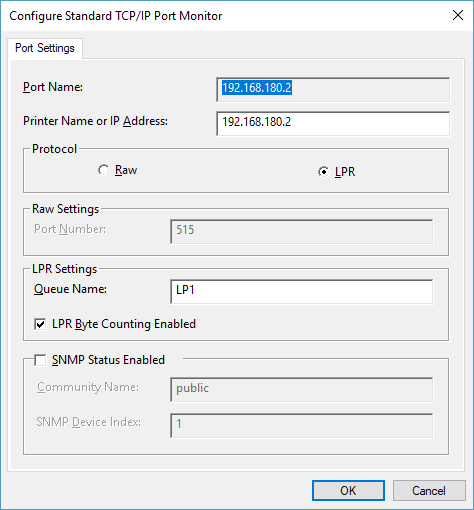
Printing now works yet it only prints one job and this job never finishes (sticks in the queue). Searching for the answer, Brooksnet provided me with a usefull hint about enabling the LPR Byte Counting. I guess this is required for the TL-PS110P to handle my print requests properly:
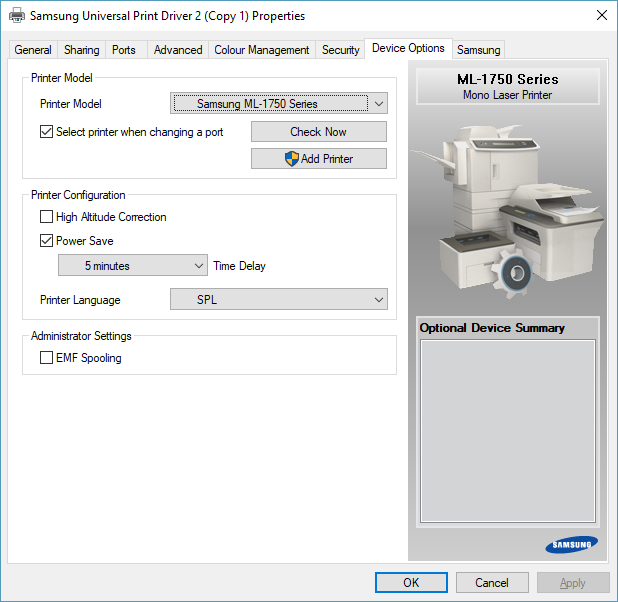
Just to be sure I also checked the Samsung driver details page and set the protocol to SPL and selected the correct model:
Attachments
- printer-port-details.png (12 kB)
- samsung-generic-driver-details.png (66 kB)